A free GDSII viewer for chip layouts
GDS Inspector lets you explore GDS/GDSII layouts in your browser, VS Code or Cursor. Inspect chip geometry, navigate cell hierarchy and visualize a process stack in 3D. It is open source under the MIT license.
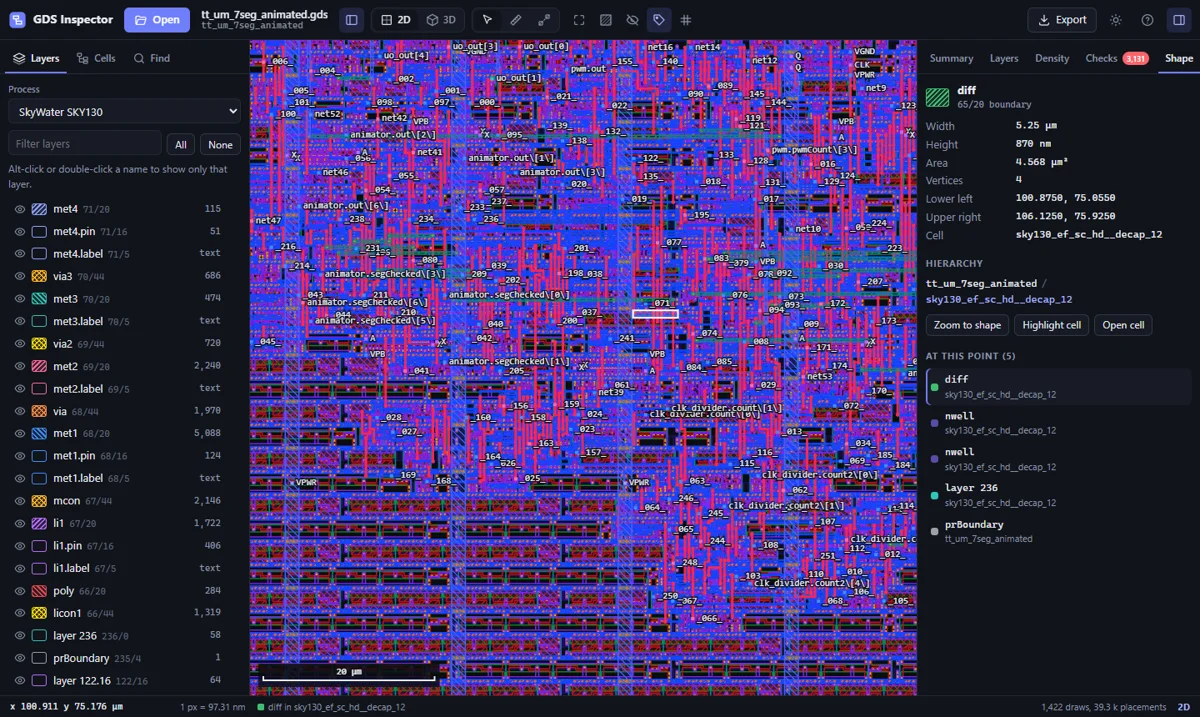
Try a chip layout without uploading a file
Start with a working example before loading your own design:
- Tiny Tapeout SKY130 chip layout — explore a complete tile and its cell hierarchy.
- SKY130 flip-flop in the GDS viewer — inspect a small standard cell, then press T for the 3D layer stack.
- IHP SG13G2 standard-cell library — browse cells from the open-source 130 nm BiCMOS process.
- Electron-beam lithography test field — inspect generated gratings from 30 nm, dot arrays, alignment marks and a Hall bar. This example is generated locally.
Inspect ASIC and nanofabrication layouts
- 2D layers, labels, hierarchy and shape inspection.
- 3D layer stack with adjustable heights, exploded view and section cuts.
- Snapping ruler, cross-sections, layer statistics and pattern density maps.
- SKY130, GF180MCU and IHP SG13G2 layer presets, plus KLayout .lyp layer colors.
- PNG and SVG exports, JSON reports and CSV layer tables.
Open a GDS file in the browser
Open the viewer and select or drop a layout file. JavaScript and WebGL2 are required. Local files are processed inside the browser without uploading the layout to a server. Remote URL examples require network access to retrieve that file.
- Choose your top cell in the hierarchy and use F to fit the layout.
- Toggle layers and click a shape to inspect its dimensions and hierarchy path.
- Use R for the snapping ruler, X for a cross-section, and T to switch between 2D and 3D.
- Export an image or analysis report to document what you inspected.
GDS viewer extension for VS Code and Cursor
Download gds-inspector-*.vsix from the extension releases. Open your editor's Extensions panel, choose the … menu and Install from VSIX. Then click a GDS file or run GDS Inspector: Open Layout.
The extension ID is OutBlade.gds-inspector. The extension is published on Microsoft Marketplace for VS Code. Open VSX publication for other editors is pending. Cursor reviews Open VSX packages through its own marketplace proxy, so appearance in Cursor search can differ from registry publication. The VSIX also works with Windsurf and VSCodium.
Supported formats and layer maps
The editor opens .gds, .gds2, .gdsii, .gdsx and .gds.gz files. OASIS files are not supported. Put a KLayout .lyp file beside your layout or configure gdsInspector.layerProperties.
Using GDS Inspector alongside KLayout
Use GDS Inspector to preview generated layouts in the same editor as your layout scripts, or share the browser viewer with a collaborator. Import a KLayout layer-properties file to reuse layer names and colors. Geometry editing and process sign-off remain in your layout and verification tools.
Can this replace sign-off verification?
GDS Inspector is a read-only viewer and inspection tool. Feature-size and rule checks help explore a layout; foundry sign-off DRC and LVS require the appropriate process tools and rule decks.